
Optimize any Hugging Face model for production
, 3 min read, By Jaber Jaber
EngineeringTo optimize a Hugging Face model for production, send us the model, your target speed and the load it must hold. We tune it down to the GPU kernel and test it at that load. If it meets your target, we host it on replicas held for your workspace.
This post covers each step, what your team decides, and the measured speeds of the open models we serve today.
How can my company optimize and host its own Hugging Face model in production on private GPUs?
Send one request: we do the tuning and the hosting. A dedicated deployment runs a model on replicas held for your workspace, under a model id of its own.
You can request any public Hugging Face model today, in the form on the Dedicated page. A private or internal model is on request: describe it in the same form and we answer.
What are the steps from our model to a tuned endpoint?
There are five steps, from your request to a live endpoint.
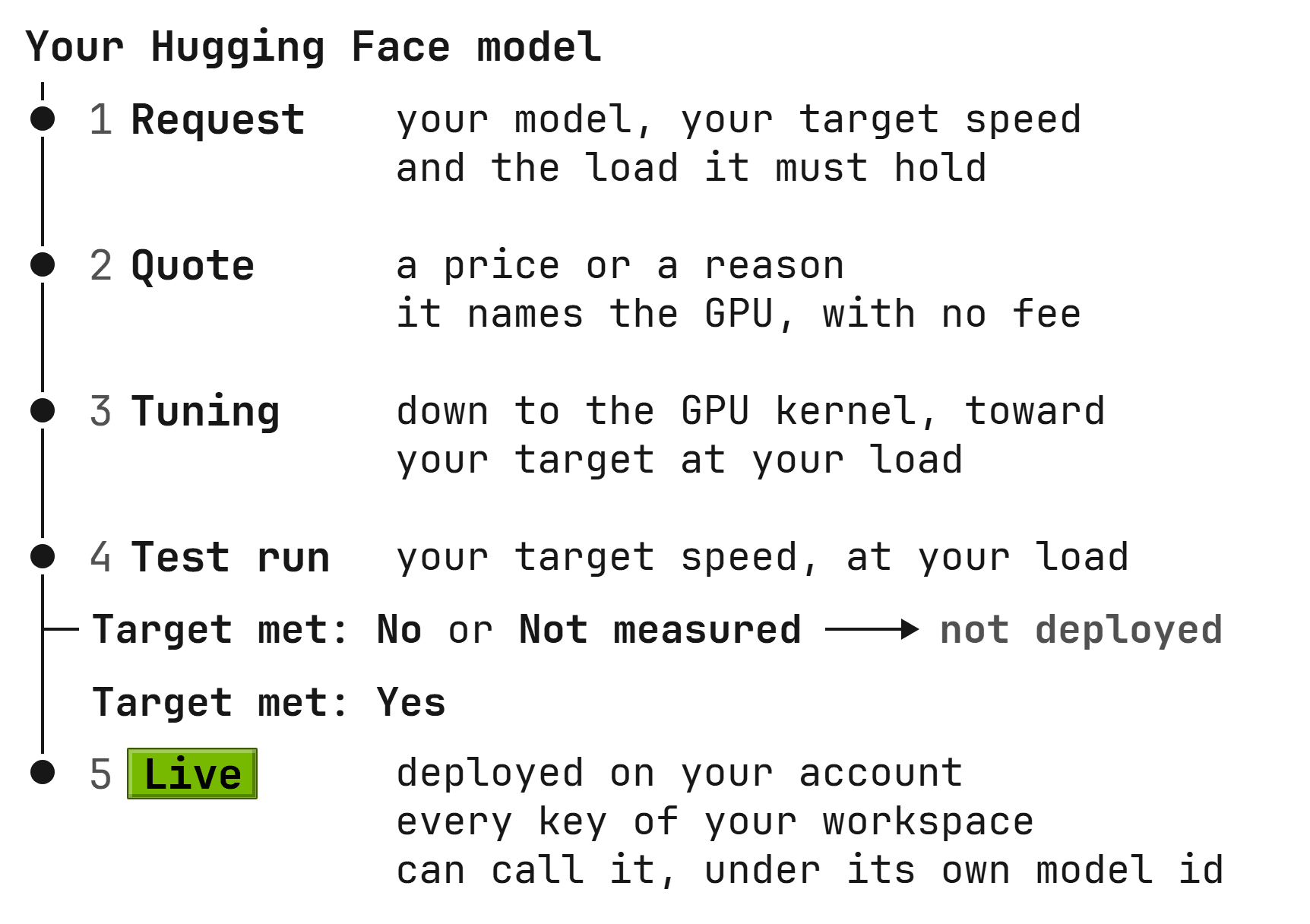
Request. You name the model in Hugging Face model, your target in Target speed per request and the load it must hold in Requests at once. Your target speed is measured at that load.
Quote. We reply on the request's page, with a price or a reason. You do not choose the GPU. The quote names it. A quote has no fee. Nothing is charged when you press Accept.
Tuning. Once you accept, we start optimizing it, or reply with a reason. We tune it down to the GPU kernel, toward your target at your load.
Test run. When it is delivered, the request reads Delivered and shows its Results: its setup and a test run. In the test run, Target met reads Yes, No or Not measured. If it reads No or Not measured, we do not deploy it.
Live. If it meets your target, we deploy it on your account. Every key of your workspace can call it, under its own model id.
Who will tune an open model to the GPU kernel for us?
We will. Bring any Hugging Face model. RightNow AI tunes it down to the GPU kernel and hosts it on private infrastructure, with zero data retention by default.
We built an internal agent that tunes a model down to the GPU kernel. Kernels are the small programs that do the math on the GPU. Your team does not write or tune them: we do, and the request shows the results.
We aim to leave the model's outputs unchanged, and on request we share how its outputs compare with the original.
How do we serve our own model at the speed we need without an infrastructure team?
You set the speed, and we do the work to reach it. Your target is a speed per request at the number of requests it must hold at once, and the test run checks it before the model serves.
Your team does not deploy it either. We do, on your account, once it is delivered and meets your target.
A deployment is priced per GPU hour, by the GPU it runs on. Requests on the deployment are included in the hourly price: its tokens are not billed. Tuning is included in the hourly price.
Do you keep our prompts and outputs?
Zero data retention: we do not store your prompts or outputs. The Terms name the two limits that apply. Data retention lists what is kept and for how long.
What speeds do the models we serve reach?
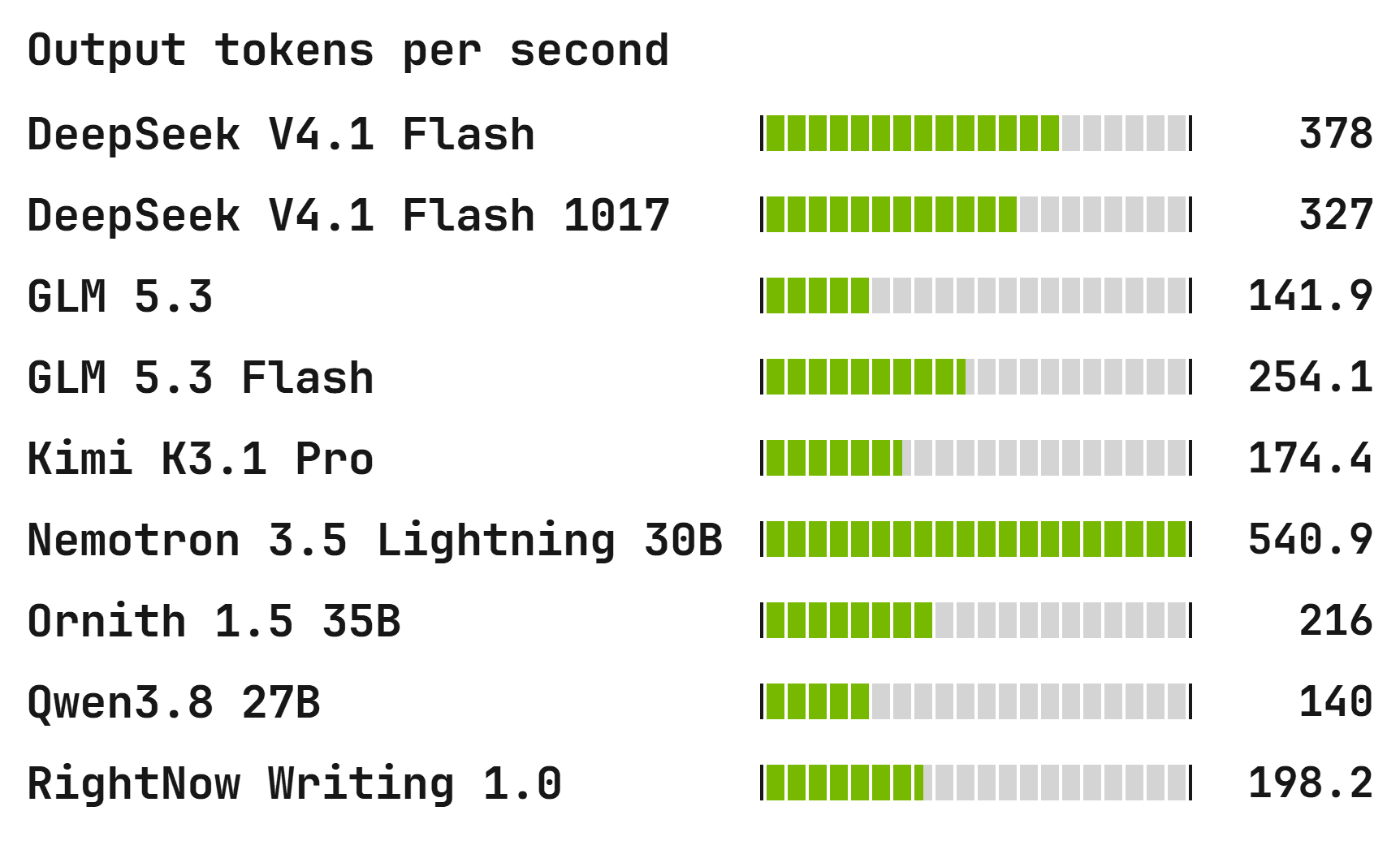
Our public model list gives a measured output speed for each open model we serve today. The table prints each figure as the list gives it, and each name opens the model's page.
| Model | Output tokens per second |
|---|---|
| DeepSeek V4.1 Flash | 378 |
| DeepSeek V4.1 Flash 1017 | 327 |
| GLM 5.3 | 141.9 |
| GLM 5.3 Flash | 254.1 |
| Kimi K3.1 Pro | 174.4 |
| Nemotron 3.5 Lightning 30B | 540.9 |
| Ornith 1.5 35B | 216 |
| Qwen3.8 27B | 140 |
| RightNow Writing 1.0 | 198.2 |
Your deployment is held to a number of its own: the target you set, measured at the load you name.
How do we start?
Start with one request, from your dashboard or from the Dedicated page. The account owner asks with Optimize a model, under Dedicated. The Dedicated deployments guide has every step.
Send us your heaviest workload. Name your model and the traffic you expect on the Dedicated page. We reply by email within a day.