
Open-weight models through one API, no GPUs to rent
, 3 min read, By Jaber Jaber
EngineeringRightNow AI serves open-weight models through one API, billed per token with no subscription. Call the open models with one workspace API key on shared capacity, and pay for usage from credits.
What can you call?
GET /v1/models is the authoritative list of hosted chat models. It also reports when one is temporarily paused.
Every model's facts are on its page in Open models. Read the live model's capabilities before requesting reasoning, tools, structured output or images.
Looking for another model? Request a model.
How do you call them?
Two protocols, chat completions at /v1/chat/completions and Messages at /v1/messages, take the same workspace key. Both reach the open models on one host. POST /v1/messages is served by the same models as POST /v1/chat/completions, with the same billing, credits, idempotency, rate limits, request-size limits and cached-input pricing.
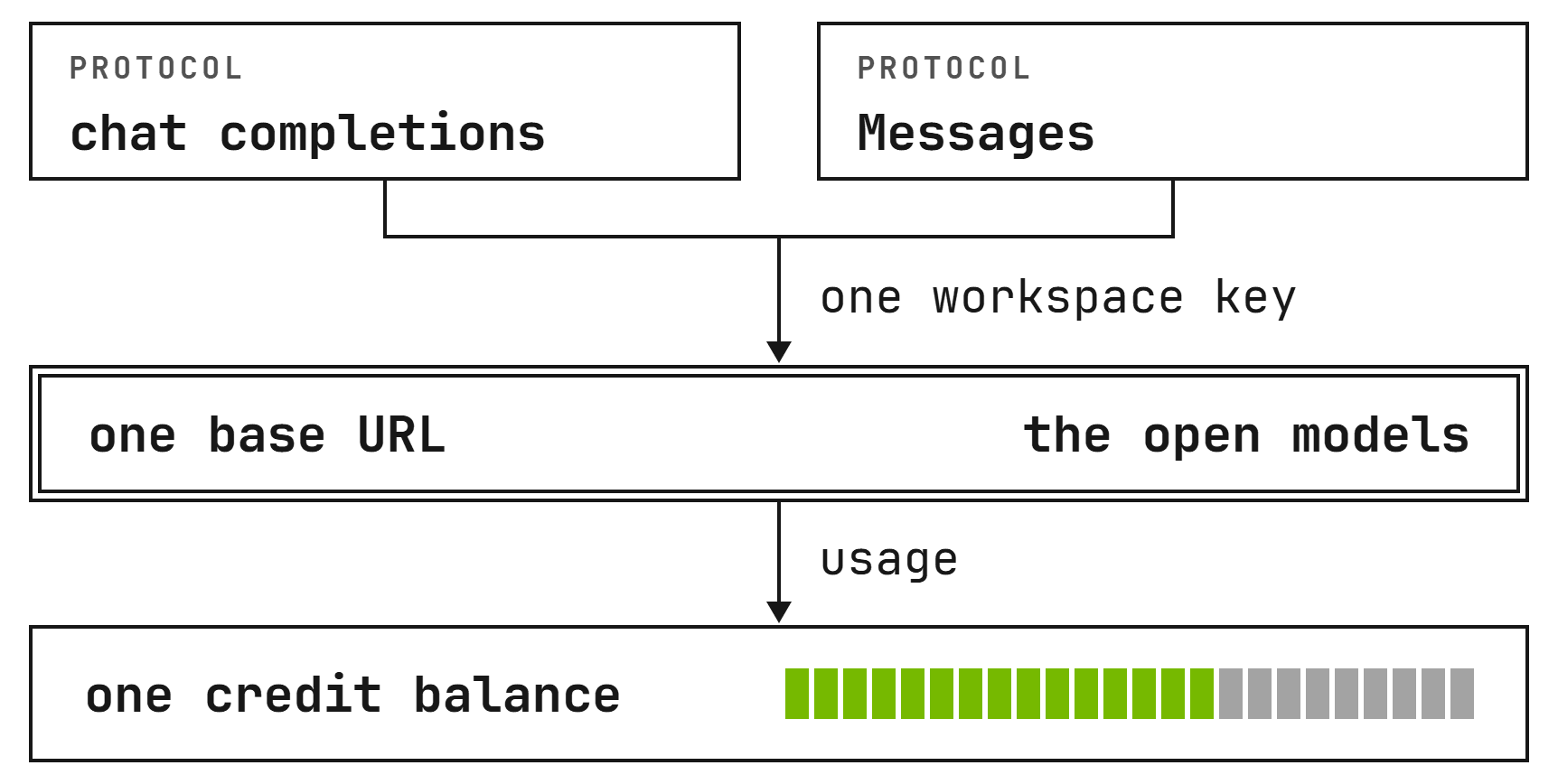
Set the base URL for your route, use a workspace API key and pass a model id.
If your code already speaks the chat API, three values change and nothing else does. In the client you already use, change three values: the base URL to https://, the API key to your workspace key, and the model to an id from GET /v1/models.
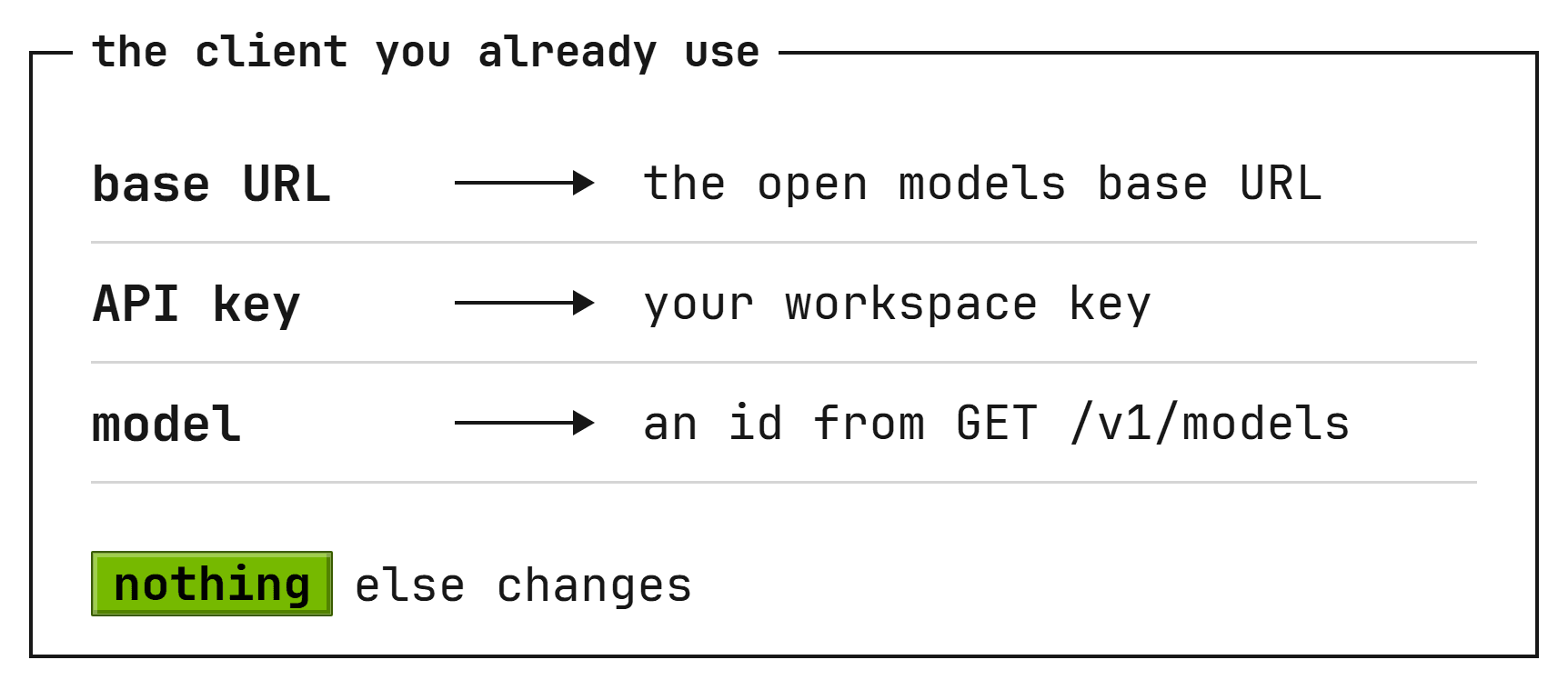
See Open-model compatible clients. Each route's fields are in Chat completions and Responses, and in Messages.
What does it cost?
Priced per model. The Pricing page lists input, cached input and output rates per million tokens; without a separate cached rate, cached input bills at the input rate.
| Model | Input | Cached input | Output |
|---|---|---|---|
| Step 5 PreviewStepFun | USD 0.90 | USD 0.09 | USD 2.43 |
| DeepSeek V4.1 Flash 1017DeepSeek | USD 0.15 | USD 0.01 | USD 0.60 |
| GLM 5.3Z.ai | USD 1.30 | USD 0.13 | USD 4.20 |
| GLM 5.3 FlashZ.ai | USD 0.11 | USD 0.03 | USD 0.45 |

Each workspace has one balance. One credit is one US dollar. Add credits when you need them and pay as you go.
No minimum spend: every account can call the open models API. Your price does not change with the size of your team.
A file of requests run through Batch, or one request sent at the batch price, costs half of list price on input, cached input and output, never combined with another discount.
The usage counts in the response are the billed counts; a local tokenizer can count differently.
At zero balance, calls to the open models API return 402 Payment Required and are not billed. See Open-model pricing and credits.
How do you start?
Get a workspace key, find a live model and send one server-side chat completions request.
Go to the Open models page, pick a model that is not marked Paused, and select Get an API key. The key is shown once: copy it then.
Keep the key in your server's secret store and inject it into the calling process as RIGHTNOW_API_KEY. Do not put the key in browser code or a prompt.
Choose an id whose availability is available and whose supported_endpoints lists chat_completions. See Call an open model.
Using a coding agent? It can set up the open models for you: copy the prompt from Set up a coding agent.
Where are the limits?
Three limits apply to your requests. Purchases raise them. Each key starts at 10,000 requests a minute, 50,000 once you buy credits, and 200,000 once your purchases reach USD 200.
Limits follow total purchases, not your balance. Concurrent limits apply while a model is busy.
A model is available, which means serving, or paused, which means temporarily not serving.
At least 7 days before a model ends, its row carries deprecated_at, end_of_life_at and successor_model. The model keeps serving until its end.
The open models API is not offered for protected health information today. HIPAA and a BAA are not available.
See Limits and Data retention.
Short answers
Do I need a card to start?
If you have no account yet, the first sign-in creates one, with no card required and $1 in credit.
Is there a subscription or a seat fee?
No. Per token, with no subscription and no per-seat fees.
Which key should I create?
Use a workspace API key for hosted models. Select the model with the model field in the request body.
Can I keep the client I already use?
Change the base URL, the key and the model id in the client you already use.
How do I raise my limits?
Add funds at Settings, Billing. Limits follow total purchases.
Is traffic encrypted?
Yes. TLS 1.2 or above everywhere. All traffic to the open models API is over HTTPS.